 billable.dev
What Belongs on a Software Development Invoice
By Mark Fulton · · 6 min read
Last verified:
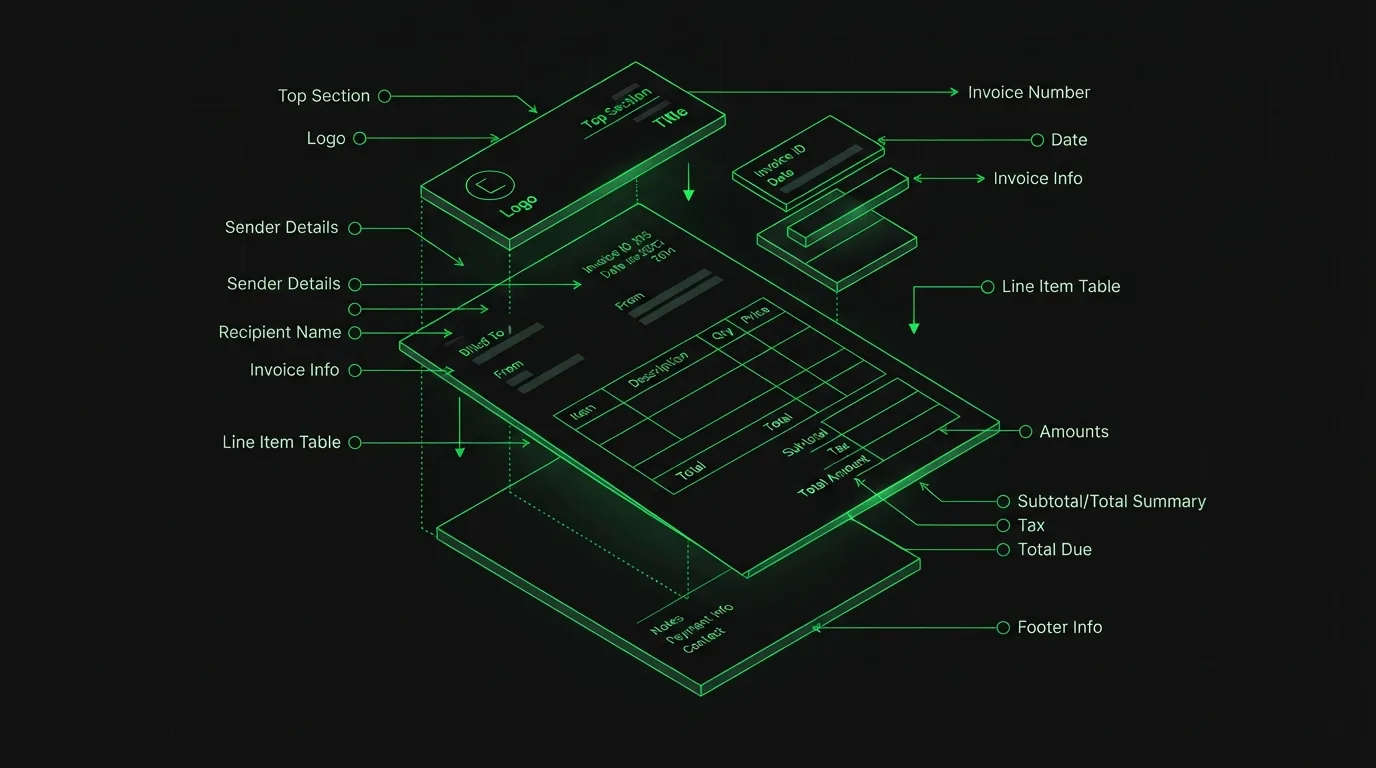
A software development invoice has one job: get approved by someone who didn't watch you do the work. Every field on it either helps that person say yes quickly or gives them a reason to put it in the "ask about later" pile. Here's the complete list of what belongs on one, and the details within each field that actually matter.
The identity block: who's billing whom
Your details. Name or registered business name, email, and mailing address. The name should match your bank account exactly: a transfer to "J. Smith Consulting" bounces or stalls when the account says "Jane Smith." If you have a business registration number or tax ID that your jurisdiction expects on invoices, it goes here too.
The client's details. The legal entity paying, not your day-to-day contact. "Billed to: Dave" is fine for a two-person startup and a problem everywhere else. Larger clients often need a specific subsidiary, a department, or a purchase-order number for their accounts-payable routing. Ask once at project start; reuse forever.
The reference block: number and dates
Invoice number. Sequential and unique: INV-0001, INV-0002, and so on across all clients. It's the handle everyone uses: payment memos, follow-up emails, your own bookkeeping, and any future audit. Duplicated or missing numbers create genuine administrative pain later. (Billable auto-increments the counter in your browser so you don't have to remember where you left off.)
Issue date. The day you send it. Payment terms count from this date, which is a good reason to send invoices the day the work period closes rather than "sometime next week."
Due date. Write the actual date. "Net 30" as the only indication forces the client to compute it and gives ambiguity room to work against you. "Due: September 7, 2026" leaves nothing to interpret. If your terms include early-payment discounts or late fees, they're referenced here and detailed in the terms block below.
The heart of it: line items
This is the section that decides how fast the invoice moves. Each line needs four things: a description, a quantity, a rate, and an amount. The craft is in the descriptions.
For hourly work, group by day or by feature, and let the descriptions reflect what actually happened:
Aug 5, checkout flow: fix auth redirect loop, add webhook retry, deploy to staging (4 hrs × $95)
That line is verifiable, specific, and readable by a non-developer. Compare "Development, 4 hours," which is none of those. Your commit history already contains this information with timestamps; converting your git log into line items is the fastest honest way to produce them.
For fixed-price work, one line per milestone, worded identically to the proposal or contract:
Milestone 2: Payment integration (per proposal dated July 3), $2,400
The matching wording matters because the approver's real task is mapping the invoice to the agreement. Make that mapping effortless.
What to avoid in line items: internal ticket numbers nobody outside the repo recognizes, minute-level time entries (they invite line-by-line negotiation), and vague catch-alls ("misc dev work"). Specific but readable is the target.
The math block: subtotal to total
Show the arithmetic plainly, in this order:
- Subtotal: the sum of line items.
- Discount, if any: as a visible line, not silently baked into rates. If you negotiated a reduction, showing it preserves your rate's integrity for next time.
- Tax: labeled with its real name and rate: "VAT (20%)", "GST (10%)", "Sales tax (8.25%)". An anonymous "tax" line is a guaranteed question. Whether you must charge tax at all depends on where you and the client are. That's accountant territory, and worth one consultation when you start.
- Total: visually distinct, with the currency stated explicitly ("USD $4,830.00"). If the client pays from another country, currency ambiguity is a real failure mode.
The instructions block: terms and notes
Payment terms. How to pay (bank transfer details, or "details provided separately" if you prefer not to put account numbers in documents that get forwarded), the due date restated, and your late policy if you have one: "Late payments accrue interest at 1.5% per month." A late fee you never charge still shortens payment times just by existing on the page. And if you want the fuller playbook on terms, deposits, and follow-ups, see getting paid on time.
If you invoice from the UK or within the EU, there's a stronger sentence available to you than an invented percentage. Both jurisdictions grant statutory interest on overdue commercial invoices by law: the Late Payment of Commercial Debts (Interest) Act 1998 sets it at Bank of England base rate plus 8 percentage points, with £40 to £100 in fixed recovery compensation on top, and Directive 2011/7/EU sets an EU floor of the ECB reference rate plus 8 points plus €40. Citing the statute reads very differently in an approvals queue than citing yourself.
Notes. The human field. A thank-you, a pointer to the next milestone, a reminder that the quote for phase two is attached. Optional, but it's the one place the invoice gets to sound like a person.
What to leave off
Brevity is a feature. Skip the multi-page legal boilerplate (that's the contract's job), the hour-by-hour timesheet (attach it separately if a client requires one), and any decoration that pushes the invoice past one page. The ideal software development invoice is a single A4 page a finance person can approve in under a minute.
The complete field checklist
| Field | Required? | Why it's there |
|---|---|---|
| Your legal/business name | Yes | Must match your bank account or the transfer stalls |
| Your address and email | Yes | Often a legal requirement; always a routing one |
| Tax ID / registration number | Jurisdiction-dependent | Some countries won't accept an invoice without it |
| Client's legal entity | Yes | Not your contact's first name: AP pays entities |
| PO number | If the client uses them | Missing PO is the single most common approval blocker |
| Invoice number | Yes | Sequential and unique; the handle for every later reference |
| Issue date | Yes | Terms count from this date |
| Due date as a calendar date | Yes | "Net 30" alone makes the client do arithmetic |
| Line item descriptions | Yes | The approver's actual reading material |
| Quantity and rate per line | Hourly work | Lets the math be checked without asking you |
| Subtotal | Yes | n/a |
| Discount as a visible line | If applicable | Protects your headline rate for next time |
| Tax, named and rated | If applicable | "Tax" unlabeled guarantees a question |
| Total with explicit currency | Yes | "1,500" means several different amounts worldwide |
| Payment instructions | Yes | Removes a round trip |
| Late-payment terms | Recommended | Works by existing, whether or not you enforce it |
| Notes | Optional | The only place the invoice sounds like a person |
The template, assembled
That's the whole anatomy: identity, reference, line items, math, instructions (roughly in that visual order, top to bottom). If you'd rather start from a working version than a blank page, the free invoice template for developers walks through the same structure section by section, and the generator produces a print-perfect PDF of it in your browser, with your data never leaving your machine.