billable.dev
Free invoice template for developers
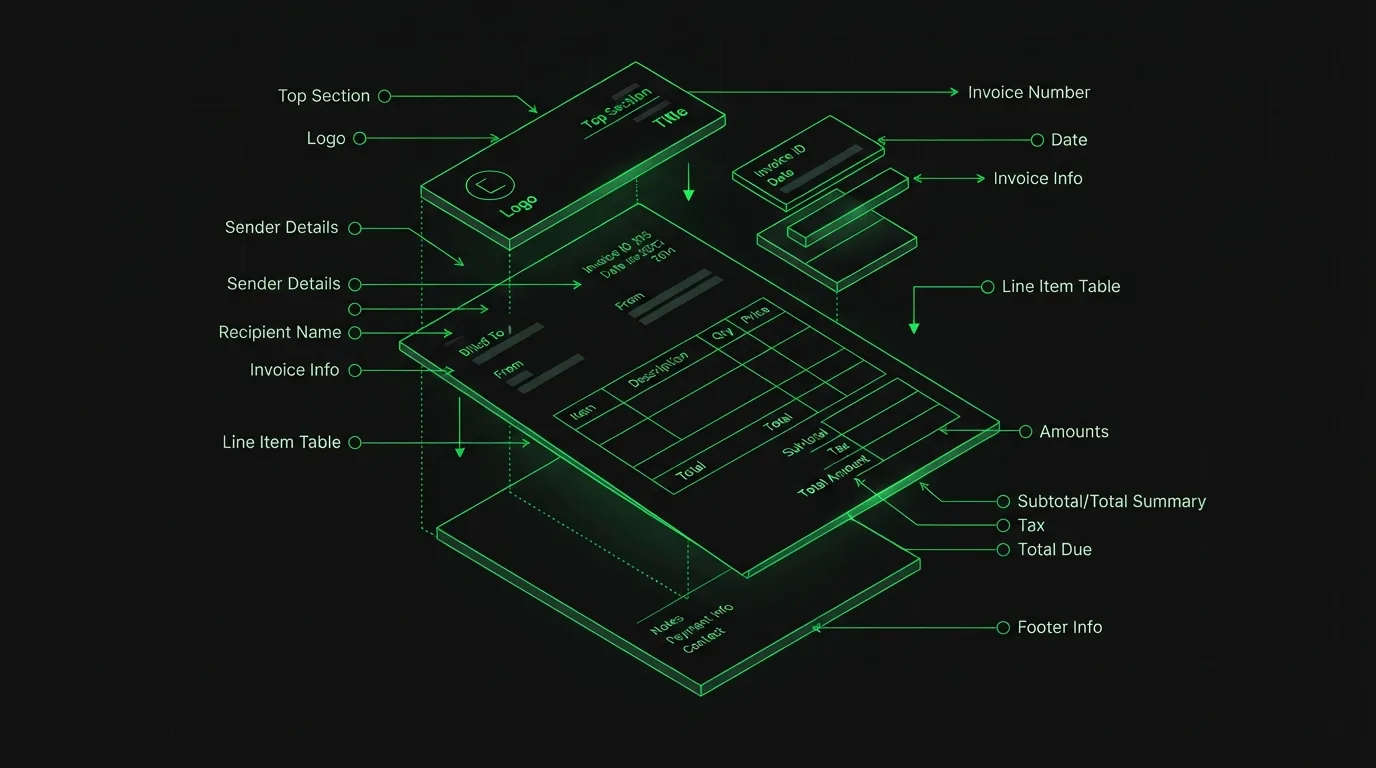
A developer invoice isn't a generic invoice with "programming" written on it. Clients approve it faster, and pay it faster, when it reads like the work actually happened. Here's every section a dev invoice needs, why it's there, and how to fill it in. Then generate yours in the browser, free, no account.
Why developers need a different invoice template
Most invoice templates are built for products: quantity, unit price, done. Development work is different. You're billing time or milestones against work that's invisible to the person approving the payment. The invoice is often the only artifact the client's finance team ever sees. If it says "Development, 40 hours," you've invited questions. If it says what shipped, day by day or milestone by milestone, you've answered them in advance.
The template below is the structure we bake into the Billable generator. Use the tool or copy the structure into whatever you already use. The structure is the point.
Section 1: Your business block
Top of the page: your name (or company name), email, and mailing address. If you operate under a registered business name, use it exactly as it appears on your bank account. Mismatches between the invoice name and the account name are one of the most common reasons transfers get held up. A logo is optional; a consistent one makes repeat invoices instantly recognizable in an inbox full of PDFs.
Section 2: The client block
"Billed to" needs the legal entity paying you, not just your contact's first name. Ask your client once: "What name and address should appear on invoices?" Larger companies often need a specific entity, a department, or a purchase-order number for accounts payable to route it. Getting this right on invoice one saves a resend on every future invoice.
Section 3: Invoice number and dates
Three fields, all load-bearing:
- Invoice number: sequential and unique (INV-0001, INV-0002…). Finance teams reference it in payment memos; you'll reference it when chasing a late one. Billable auto-increments it for you.
- Issue date: when you sent it. Net terms count from here, so send invoices promptly; every day you sit on one is a day added to your effective payment time.
- Due date: an actual calendar date, not just "net 30". "Due September 7, 2026" is unambiguous; "net 30" makes the client do date math, and some will do it generously.
Section 4: Line items that describe real work
This is where developer invoices are won or lost. Each line needs a description, a quantity (hours for time-based work), a rate, and an amount. Two patterns work well:
- Hourly: group by day or by feature. "Aug 5, checkout flow: fix auth redirect, add webhook retry (4 hrs)" tells a complete story. Your commit history is the best source for these descriptions. Billable's git log import builds them automatically, grouped by day.
- Fixed-price: one line per milestone from your proposal, quantity 1. The description should match the proposal wording so the client can map invoice to agreement without asking.
Either way: write descriptions for the person approving payment, not for another developer. "Implemented OAuth 2.0 PKCE flow" can stay (it's specific and it's real), but skip internal jargon and ticket numbers nobody outside the repo will recognize.
Section 5: Subtotal, tax, discount, total
Keep the math visible: subtotal, then any discount, then tax on the discounted amount, then the total. If you charge VAT, GST, or sales tax, label it with the actual name and rate ("VAT 20%"). An unlabeled "tax" line is another question you'll get asked. Whether you need to charge tax at all depends on where you and your client are based; that's a question for an accountant, not an invoice template.
Section 6: Payment terms and notes
The terms block is your contract's enforcement arm in miniature. State the due date, accepted payment methods, and, if you use one, your late-fee policy. "Payment due by [date] via bank transfer. Late payments accrue interest at 1.5% per month." is complete. The notes field is for the human touch: a thank-you, a pointer to what's next, or bank details if you share them in the document.
What to leave off
Resist the urge to add more. No hourly breakdown to the minute (it invites nitpicking), no discount you weren't asked for, no wall of legal text (that's what the contract is for). A one-page invoice that a finance person can approve in fifteen seconds is the goal.
Billing model changes the shape of the invoice more than the trade does. If you bill time, the hourly invoice template covers rounding and time entries; if you bill a monthly commitment, the retainer invoice template covers period lines and overage.
Use the template in your browser
Billable is this template as a working tool: split-screen editor and live preview, print-perfect A4 PDF output, saved invoices, JSON export, CSV import, and the git log import. Everything runs client-side: your rates and client names never leave your machine. It's free because static files cost us almost nothing to serve.